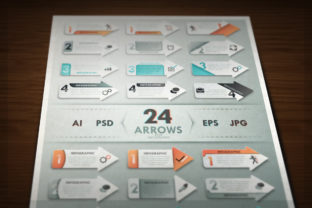
24 Arrows for Infographic: A Designer’s Toolkit for Visual Clarity
Visual communication plays a crucial role in how we interpret information. Whether it's a business report, educational material, or a marketing campaign, the clarity and aesthetics of visual elements can significantly impact understanding and engagement. One such essential element in the world of design is the arrow. The 24 Arrows for Infographic set offers a versatile and high-quality solution for designers seeking to enhance their visual storytelling with precision and style.
This collection features 24 unique paper-style arrows, each crafted from white and colored components to add depth and interest. Designed with flexibility in mind, the set includes multiple file formats—EPS, AI, JPG, and PSD—ensuring compatibility with a wide range of design software and workflows. Whether you're creating a complex data visualization or a simple directional guide, these arrows provide both form and function.
Understanding the Components of the 24 Arrows for Infographic Set
Each arrow in the 24 Arrows for Infographic set is a vector-based graphic, which means it can be scaled without loss of quality. This is particularly important when designing for different platforms and screen sizes. Let’s take a closer look at what the package includes:
- 6 EPS10 files – Ideal for vector editing and printing, these files are compatible with most vector graphic software.
- 6 AI files with “Live text” – These Adobe Illustrator files allow for full editability, including text changes and color adjustments.
- 6 JPG images at 300dpi – Perfect for web use or when a raster format is required, these images maintain high resolution.
- 6 PSD layered files at 300dpi – Created in Illustrator CC, these files offer layered editing capabilities for those working in Photoshop.
It’s important to note that while PSD files provide layered access, some features may not render perfectly outside of Illustrator. For maximum flexibility and control, Adobe Illustrator is recommended when editing vector elements such as gradients and meshes.
Why Arrows Matter in Infographic Design
Arrows are more than just directional indicators; they are powerful tools for guiding the viewer's eye and establishing visual hierarchy. In infographics, arrows help connect ideas, highlight relationships, and direct attention to key information. The 24 Arrows for Infographic set enhances this functionality by offering a variety of styles that can be adapted to different themes and tones.
For example, a minimalist white arrow may suit a clean, modern layout, while a colorful, textured arrow could add vibrancy to a playful or educational design. The inclusion of both white and color pieces allows designers to mix and match, creating arrows that align with the overall aesthetic of their project.
Practical Applications Across Industries
One of the standout features of the 24 Arrows for Infographic collection is its broad applicability. Here are just a few ways different professionals can benefit from this resource:
- Business Presentations: Use arrows to guide your audience through a flowchart, timeline, or organizational structure.
- Educational Materials: Enhance diagrams and instructional content with clear, visually appealing directional cues.
- Marketing Campaigns: Direct attention to calls to action, product features, or promotional offers.
- Website UI/UX Design: Improve navigation and user experience with intuitive visual signals.
- Data Visualization: Connect charts, graphs, and annotations to illustrate cause-and-effect relationships or trends.
Because the arrows are fully layered and well organized, they can be easily customized to fit the specific needs of any project. Whether you're adjusting colors to match a brand palette or modifying shapes for a unique visual style, the tools are in place to support your creative vision.
Design Flexibility and Customization
The 24 Arrows for Infographic set is built with customization in mind. Each arrow is composed of vector shapes, which means you can scale, rotate, and recolor them without compromising quality. The inclusion of gradients and meshes adds a level of realism and dimension that can elevate the overall design.
Designers who work with Adobe Illustrator will find the “Live text” feature particularly useful. This allows for real-time editing of text elements within the arrow compositions, making it easier to integrate with other design components. Additionally, the layered structure of the PSD files enables detailed adjustments, such as changing background textures or adjusting lighting effects.
For those less experienced with vector editing, the high-resolution JPG files offer a ready-to-use alternative. These can be dropped directly into presentations, websites, or print materials without the need for additional editing tools.
Best Practices for Using the 24 Arrows for Infographic Set
To get the most out of this resource, consider the following best practices:
- Consistency is key: Stick to a limited number of arrow styles within a single project to maintain visual harmony.
- Match the tone: Choose arrow colors and textures that align with the overall design theme—whether it's professional, whimsical, or technical.
- Use arrows strategically: Avoid overloading your design with too many arrows. Each one should serve a clear purpose in guiding the viewer.
- Test for clarity: Ensure that arrows remain legible at different sizes, especially when used in digital formats or printed materials.
- Optimize for performance: When using JPG or PSD files on websites, compress images appropriately to maintain fast load times without sacrificing quality.
Comparing the 24 Arrows Set to Other Infographic Resources
There are many infographic toolkits available today, but few offer the same level of detail and flexibility as the 24 Arrows for Infographic set. Many generic arrow packs provide only basic shapes in limited formats. In contrast, this collection delivers a curated set of 24 distinct designs across multiple file types, ensuring both visual variety and technical adaptability.
Additionally, the inclusion of AI and EPS files with editable vector shapes sets this set apart from raster-only alternatives. Vector graphics allow for infinite scalability and precise editing, which is essential for professional-grade design work.
Who Should Use the 24 Arrows for Infographic Set?
This set is ideal for a wide audience, including:
- Graphic designers looking for polished, reusable assets.
- Content creators building engaging visuals for blogs or social media.
- Business professionals developing presentations or reports.
- Educators creating instructional materials or classroom visuals.
- Developers integrating visual elements into websites or applications.
Whether you're a seasoned designer or a beginner, the 24 Arrows for Infographic set offers a valuable resource that can enhance your visual communication efforts. Its combination of high-quality design, multi-format support, and ease of customization makes it a worthwhile addition to any creative toolkit.
Final Thoughts on the 24 Arrows for Infographic Collection
In an age where visual content dominates digital communication, having access to well-designed, flexible assets is more important than ever. The 24 Arrows for Infographic set stands out as a comprehensive and practical solution for anyone involved in creating infographics, presentations, or visual storytelling materials.
By offering a diverse range of arrow styles, high-resolution formats, and full editability, this set empowers designers to create professional, engaging visuals with ease. Whether you're illustrating a complex concept or simply guiding the viewer's attention, the right arrow can make all the difference—and this collection ensures you have the right tools at your fingertips.