Enhancing Visual Communication with the Vegetable Icons Set
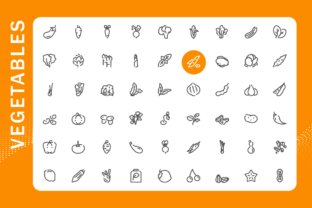
Visual communication plays a crucial role in today’s digital landscape, especially when conveying information related to food, health, and sustainability. The Vegetable Icons Set is a comprehensive collection of 54 line icons that represent a wide variety of vegetables, offering designers, developers, and content creators a versatile toolkit for their projects. Whether you're building an app, designing an infographic, or developing a website focused on nutrition, agriculture, or wellness, this icon set provides a clean, scalable, and easy-to-use solution.
Understanding the Vegetable Icons Set
The Vegetable Icons Set includes 54 individual icons, each representing a specific vegetable—from common choices like carrots and tomatoes to more niche items like artichokes and leeks. Each icon is provided in multiple formats including transparent PNG files in four resolutions (512x512px, 256x256px, 128x128px, and 64x64px), a high-resolution 3000x3000 JPG file, and editable vector formats such as AI CS6 and EPS10. These formats ensure that the icons can be used across a wide range of platforms and design tools without losing quality or flexibility.
All icons are neatly organized into separate folders by name, making it easy to locate and use the specific vegetable you need. This level of organization is especially helpful for larger projects where time and efficiency are critical factors.
Common Challenges in Visual Design for Food-Related Projects
Designing content around food, nutrition, or agriculture often requires clear, recognizable visuals that communicate ideas quickly and effectively. However, many creators face challenges such as:
- Finding icons that are both visually appealing and accurate in representation
- Ensuring scalability across different screen sizes and resolutions
- Maintaining a consistent design language across platforms
- Managing file compatibility across design tools and development environments
These challenges can lead to wasted time, inconsistent branding, and ultimately, a less engaging user experience. The Vegetable Icons Set is designed to directly address these issues by offering a unified, high-quality visual resource that supports a wide range of use cases.
How the Vegetable Icons Set Solves Real Design Problems
By providing a full suite of vegetable icons in multiple formats, this set empowers designers and developers to streamline their workflow and maintain visual consistency. Here's how it helps:
Scalability Without Quality Loss
With icons available in resolutions from 64x64px up to 3000x3000px, users can confidently deploy visuals across mobile apps, web banners, print materials, and presentations. The inclusion of vector formats (AI and EPS) ensures that icons can be scaled infinitely without any loss of quality, making them ideal for responsive web design and high-resolution printing.
Seamless Integration Across Tools
Whether you're working in Adobe Illustrator, Photoshop, Figma, or a code-based framework like React or Flutter, the variety of file types in the Vegetable Icons Set ensures compatibility. Developers can easily integrate PNGs into their UI components, while designers can edit vector files to match brand colors or style guides.
Improved User Engagement
Icons are more than just decorative elements—they help users navigate content, understand complex data, and make informed decisions. For example, a nutrition app using accurate vegetable icons can help users quickly identify ingredients or track dietary habits. In infographics, these icons can visually reinforce key points about healthy eating or sustainable farming practices.
Practical Applications of the Vegetable Icons Set
The versatility of the Vegetable Icons Set makes it applicable across a variety of industries and use cases:
1. Nutrition and Wellness Apps
Apps focused on calorie tracking, meal planning, or dietary education can benefit from clear, recognizable vegetable icons. Each icon can represent a specific food item in a database or interface, helping users quickly find and log their meals.
2. Educational Materials and Infographics
Teachers, content creators, and health professionals can use these icons to illustrate the benefits of different vegetables, compare nutritional values, or explain the role of plant-based diets in overall wellness. The clean line style ensures readability even when printed or viewed on mobile devices.
3. E-commerce and Recipe Websites
Online grocery platforms or recipe sites can use the icons to categorize products, highlight featured ingredients, or enhance search filters. A recipe card, for instance, might display icons for each vegetable used in a dish, improving both visual appeal and usability.
4. Farming and Sustainability Projects
Organizations focused on urban farming, permaculture, or sustainable agriculture can incorporate these icons into guides, apps, or educational campaigns. Whether illustrating crop types or promoting local produce, the icons offer a professional and consistent visual language.
Who Can Benefit from the Vegetable Icons Set?
This icon set is particularly valuable for:
- UI/UX Designers looking for consistent, scalable icons for food-related apps and websites
- Graphic Designers creating infographics, posters, or educational materials
- Developers integrating icons into mobile or web applications
- Content Creators and educators who need visual aids for health and wellness topics
- Marketing Teams developing branded assets for food brands or agricultural businesses
Each of these user groups may approach the set differently. For instance, a developer might focus on the PNG and SVG files for integration into a front-end framework, while a designer might use the AI or EPS files to customize the icon style to match a brand’s aesthetic.
Choosing the Right Format for Your Needs
Understanding which file format to use depends on your project’s requirements:
- PNG – Best for quick integration into apps, websites, or presentations where transparency and resolution matter
- JPG – Useful for print materials or large-format visuals where background compatibility is not an issue
- AI / EPS – Ideal for designers who need to edit the vector paths, change colors, or scale icons for print or high-resolution use
For example, if you're designing a mobile app, the 512x512px and 256x256px PNG files will provide excellent clarity on high-DPI screens. If you're creating a poster or brochure, the 3000x3000 JPG or vector files will ensure sharp, professional results.
Maximizing the Value of the Vegetable Icons Set
To get the most out of this set, consider the following tips:
- Organize icons by project – Create subfolders for each project to streamline asset management.
- Customize vector files – Use the AI or EPS versions to tweak line thickness, color schemes, or icon styles to align with your brand identity.
- Optimize for performance – Use appropriately sized PNGs to reduce load times in web and app environments.
- Create visual hierarchies – Use larger icons for primary vegetables and smaller ones for secondary elements to guide user attention effectively.
Conclusion
The Vegetable Icons Set is more than just a collection of images—it's a powerful tool that enhances clarity, engagement, and professionalism across a wide range of projects. Whether you're designing an educational infographic, building a nutrition app, or launching a sustainable farming initiative, this set offers the flexibility, quality, and usability you need to succeed. By choosing the right formats and organizing your assets effectively, you can ensure that your visual content is both impactful and easy to maintain over time.