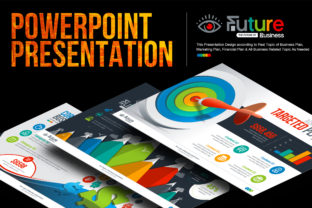
BusinessPlan PowerPoint Presentation: A Dynamic Tool for Strategic Communication
Creating a compelling presentation is more than just arranging slides — it’s about conveying a vision, strategy, or plan with clarity and impact. The BusinessPlan PowerPoint Presentation offers a modern, multipurpose solution for professionals, entrepreneurs, educators, and creatives who need to communicate ideas effectively. Whether you're pitching to investors, presenting an annual report, or training a team, this template provides a structured yet flexible foundation to support your goals.
What Is the BusinessPlan PowerPoint Presentation?
The BusinessPlan PowerPoint Presentation is a professionally designed, fully customizable slide deck tailored for a wide range of business and personal uses. It includes 269 unique slides, built from a total of 48,000 master slide layouts, ensuring you have the flexibility to adapt the design to your specific needs. With support for both 16:9 widescreen and 4:3 normal screen formats, the template is optimized for digital presentations and print-ready outputs like US Letter documents.
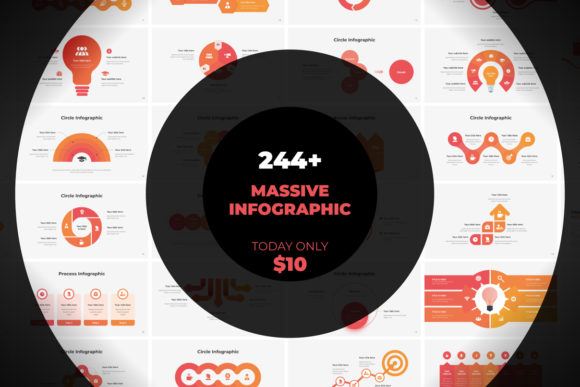
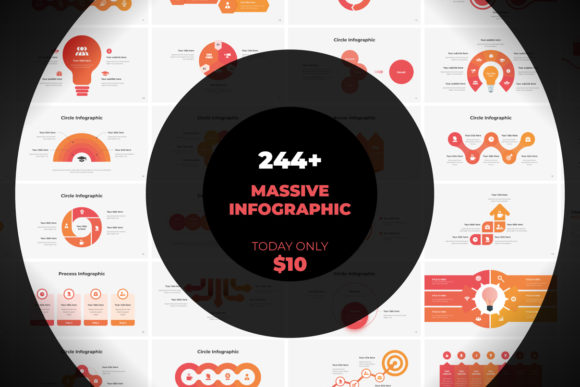
Each slide integrates infographic elements, charts, graphs, and over 2,500 vector EPS icons, allowing you to visually represent data, processes, and concepts without needing advanced design skills. The template supports 30 color variations — including single-color, multicolor, and mix-color themes — so you can align the visuals with your brand identity or presentation context.
How to Use BusinessPlan PowerPoint in Real-World Workflows
One of the most valuable aspects of the BusinessPlan PowerPoint Presentation is its versatility. It can be used before, during, and after key business activities, enhancing communication and decision-making at every stage.
Before a Project or Decision
When preparing for a new project, business plan, or funding request, the template helps structure your thinking and present it coherently. For example, a startup founder pitching to investors can use the slides to outline market research, business model, growth projections, and team structure. The built-in charts and graphs allow for data-driven storytelling, while the smart art and placeholder features streamline the process of organizing complex information.
Using this template during the planning phase also ensures that your presentation aligns with broader strategic documents like business plans or marketing strategies. This alignment helps maintain consistency across internal and external communications.
Durinng Execution and Review
Once a project is underway, the BusinessPlan PowerPoint Presentation becomes a valuable tool for tracking progress, reporting results, and adjusting strategies. Project managers can use the template to create monthly or quarterly reports, using slide variations that highlight KPIs, timelines, and budget allocations.
For marketing teams, the template supports post-launch reviews by providing slides that visually compare projected vs. actual performance, customer engagement metrics, and social media impact analysis. This makes it easier to identify what worked, what didn’t, and how to adjust for future campaigns.
After Implementation
At the end of a business cycle or product launch, the template serves as a platform for summarizing learnings and presenting outcomes. Annual reports, retrospective reviews, and strategic planning sessions benefit from the clean, professional layout and data visualization tools built into the slides.
Educators and trainers can repurpose the same slides to create instructional materials, course summaries, or internal training decks. The flexibility of the template ensures it remains relevant across different industries and use cases.
Integration with Other Tools and Platforms
The BusinessPlan PowerPoint Presentation works seamlessly with other tools commonly used in business and creative workflows. Whether you're collaborating in a team or working independently, integration is straightforward:
- Design Tools: The template supports drag-and-drop image uploads and includes editable vector graphics, making it compatible with tools like Adobe Photoshop and Illustrator. You can also export slides to PDF or image formats for use in other platforms.
- Data Tools: Charts and graphs can be linked or imported from Excel, allowing for real-time data updates without manual editing.
- Collaboration Platforms: PowerPoint files can be shared via cloud services like Google Drive, Dropbox, or Microsoft OneDrive, enabling real-time collaboration and feedback.
- Presentation Tools: Whether you're presenting in person, via Zoom, or through screen recording software, the 16:9 widescreen format ensures compatibility across platforms and devices.
This level of integration means the template doesn’t just stand alone — it becomes a central part of your content creation and communication process.
Practical Implementation Tips
To get the most out of the BusinessPlan PowerPoint Presentation, consider the following tips:
- Customize for Consistency: Use the 30 available color versions to match your brand guidelines. Consistent visuals help reinforce your message and make your presentation more memorable.
- Use Placeholders Strategically: The template includes custom placeholders for images, text, and data visualizations. These help maintain layout consistency and make editing faster and more efficient.
- Focus on One Message per Slide: Avoid overcrowding slides with too much information. Use the clean layouts to highlight one key point per slide, supported by relevant visuals or data.
- Take Advantage of Animations: Each object in the template has custom animation options. Use them sparingly to guide the viewer’s attention, not to distract.
- Repurpose Slides: Don’t create from scratch every time. Save frequently used slides in a personal library for reuse across different presentations.
Long-Term Use and Scalability
As your business or personal projects evolve, so will your presentation needs. The BusinessPlan PowerPoint Presentation is designed with scalability in mind. Its modular structure allows you to mix and match slides, update visuals, and integrate new content without starting over.
For small business owners and entrepreneurs, this means you can use the same template for everything from investor pitches to internal strategy meetings. Educators can adapt slides for course materials, webinars, or student presentations. Freelancers and marketers can tailor the template for client proposals, campaign reports, or portfolio showcases.
Because the template includes both bright and dark theme options, it’s also future-proof — you can easily adjust the visual tone to match changing design trends or audience preferences.
Conclusion: A Tool That Grows With Your Needs
The BusinessPlan PowerPoint Presentation is more than just a slide deck — it's a strategic asset that supports planning, communication, and execution across a wide range of professional and personal scenarios. By offering a balance of design flexibility, functional features, and ease of use, it empowers users to create presentations that are not only visually appealing but also deeply effective in conveying their message.
Whether you're preparing a business plan, reviewing a marketing campaign, or delivering a training session, this template helps streamline your workflow, reduce design time, and elevate your presentation quality. In a world where clear communication is critical, having a reliable, adaptable tool like the BusinessPlan PowerPoint Presentation in your toolkit can make all the difference.